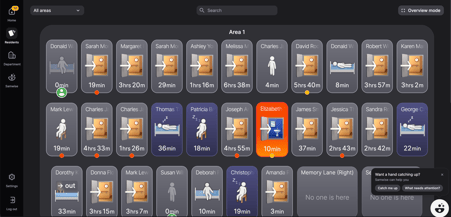
- The overview page will show a display of resident cards of all the individual residents/patients at your site
- The resident cards will demonstrate the activity of each resident - for e.g., if they are sleeping, sitting or out of the room (see more about reading the resident cards in ‘Understanding Resident Cards’.
- Resident cards will light up if a notification is being sent to the mobile app.
- Clicking on a resident card will open up their individual resident profile.
- Navigate throughout the desktop utilizing the menu on the left side of the screen.