After clicking 'Start shift', you need to select which residents you want to receive alerts for before you can actually start your shift. By default, all residents are selected, and you can simply click 'Confirm' if you want alerts for all residents.
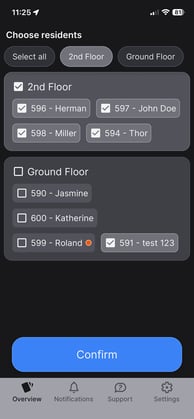
If you want to limit which residents you receive alerts for, you have two options:
The first option is to manually uncheck the boxes for individual residents you do not want alerts for, or for entire houses or departments.
The second option is to click on the department you are working in at the top of the page, and thereby select alerts for that department.
Once you have selected the residents that match your area of responsibility, click 'Confirm' and the selected residents will appear on the overview, and you'll be logged in.