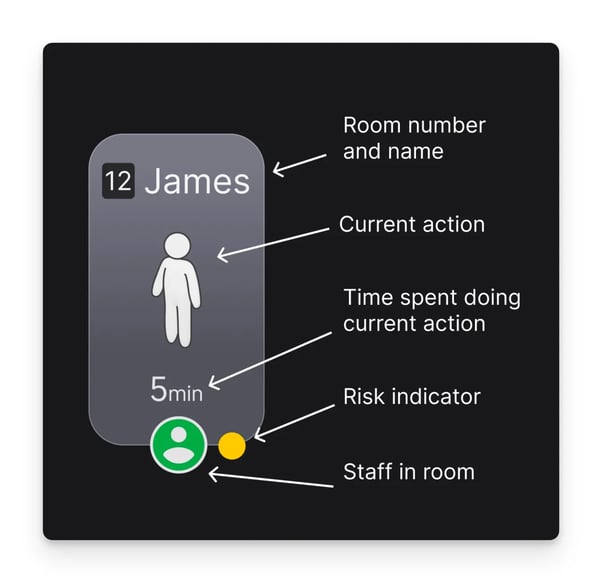
What we at Teton call a 'resident card' is an individual card for each resident in a department, and when looking at the overview you can see all the person cards simultaneously. With the resident card you have the opportunity to see the residents' current activity, how long the activity has been ongoing, what risk indicator the person has, and if there are other people besides the resident inside the room.
On the computer, tablet, or phone, you can always click on the card to get more information about the resident in question.
The resident card can show you the following basic information:
- Room number or name (or both)
- The resident’s current action
- How long the resident has been doing that action
- A risk indicator to indicate the amount of notifications on that resident
- A green circle that pops up when staff are in the room (we don’t show what the staff are doing)
What you will usually see on a resident card:
The sensor can show the following actions:
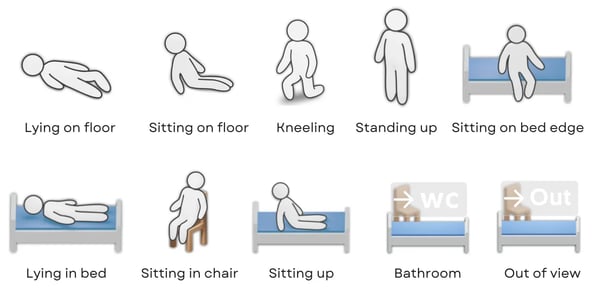
- Lying on floor
- Sitting on floor
- Kneeling
- Standing up
- Sitting on bed edge
- Lying in bed
- Sitting in chair
- Sitting up
- Bathroom
- Out of view
What it means when the resident card says 'Turned Off':
The sensor is turned off and not on the network. This may be due to network issues, or the sensor being turned off because the resident has not given consent. If this is not intentional, please check if the power cables are plugged in in the apartment. If the power is connected, try unplugging the sensor, wait 30-60 seconds, and then plug it back in. If the issue persists, contact Teton.