Receiving alarms is core to helping you quickly react to urgent situations. We have spent extra care making alarms as helpful for you as possible, while minimizing irritating and distracting sounds.
We treat falls a little bit differently than all other alarms because they are so urgent, and require extra care, for example if someone hasn’t reacted to a fall alarm within two minutes, then we will send another one… and another one… and another one, until someone reacts.
To learn more about other alarms, check out this article.
A fall alarm sets of a series of events within the mobile app.
-
An alarm sound is sent out to all staff who have that resident selected. (you can also ask for the alarms to be read out instead).
-
Pick up your phone and tap on the notification
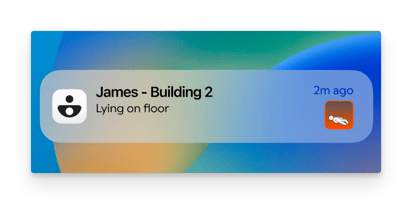
A fall notification on the lock screen of a phone
-
Unlock your phone and it will take you to the teton app, and the specific resident that the alarm was sent on.
-
The resident card will be red, and the resident sheet will also be red, in order to indicate an active alarm.
-
The fall animation will be viewable within a matter of seconds of the fall happened. You can use this to evaluate the fall, and the urgency of reacting to it. Tap on the animation to watch it full screen.
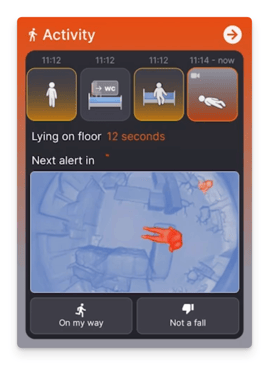
With an active fall, the activity box will present you with an animation of the fall, and a set of actions for you to take.
Re-alarming cycle
- A timer will indicate how long the resident has been on the floor
- If the resident is still on the floor after 2 minutes, we will resend the alarm.
- The system will then wait another 2 minutes, and if the resident is still on the floor then an alarm will be forwarded to all staff who are logged in on a phone, even if they haven’t selected that resident. A little arrow will be added to the card to indicate that this is a forwarded alarm.
- The system will continue to send a new alarm every 2 minutes until the fall is resolved.
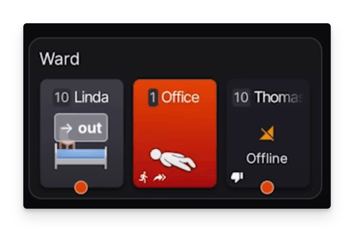
💡If no one has responded to a fall and a resident is still on the ground after 4 minutes, then the alarm will be sent to all phones, even if the staff have not selected that resident.
Marking yourself as ‘on the way’
- If you receive a fall, you can tap ‘on my way’. This will add an icon to the card to indicate to other staff that someone has seen and is responding to the alarm. Selecting on my way will also add another two minutes to the timer before
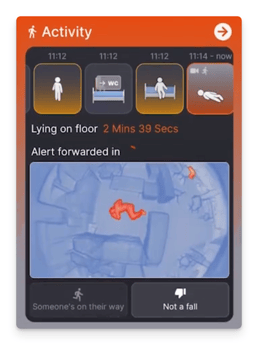
A fall where someone else on the team has marked themselves as ‘on their way’ Note the small running man icon, this will also be on the resident card.
How a fall is resolved
Falls can be resolved in various ways, when a fall is resolved the system will stop sending alarms:
- If a resident gets leaves the floor (for example by standing up)
- If staff enter the room and are with the resident for more than 20 seconds
- Active fall alarms can be marked as ‘not a fall’. Here you will be offered the option to either say that the resident was
- Safe to ground - (the resident was going down on the floor to do something, but it was not a fall). The red colour will be removed from the card, and a tick will be added to the card to show it as ‘resolved’.
- Incorrect action - this indicates that the system was incorrect in saying that a resident was on the ground. The red colour will be removed from the card, and a thumbs down will be added to the card to show it as ‘incorrect’.